| 1. |
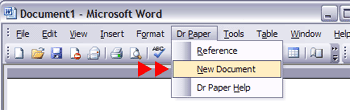
Start Word, and click Addins, Dr Paper, New Document.
(If you are using Word 2003, click Dr Paper, New Document.)
Note:
If this is the first document you have created with Dr Paper,
you may be asked to Enable the Macros.
|

|
| 2. |
Set the options on the Dr Paper Templates dialog for the style of
paper, and click Next.
If you need to create a document in MLA or Turabian style, change
the option to the style you need.
|

|
| 3. |
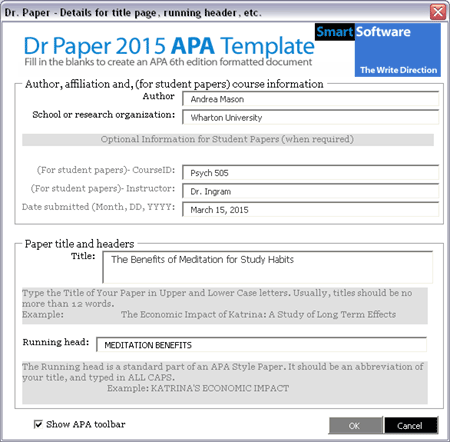
Complete the Dr Paper dialog with your name, your school,
the title of your paper, etc., and click OK.
(If you are writing a research paper for publication,
do not complete the optional information for student papers.)
|
|
| 4. |
Use Word to SAVE your document with a name you will remember.
Once the document has been created, you can edit it as you would any
other Word document.
BACKUP your paper regularly.
|
Note:
The first time you create a document with Dr Paper, Word will ask you to enable the macros in the Dr Paper template.
Check "Always trust macros from this publisher", and then click
Enable Macro:




